
Exam Page
The Exam Page randomly selects a question from the active dictionary, and the user must guess the correct answer. If the user determines their answer was correct, they can mark the question as completed, which prevents the application from selecting it again.
Keep in mind that the Exam Page does not check or evaluate user answers. In fact, it doesn't provide a field to type an answer. It is up to the user to track their own progress. We will discuss how this page is designed and how to use it in the sections below.
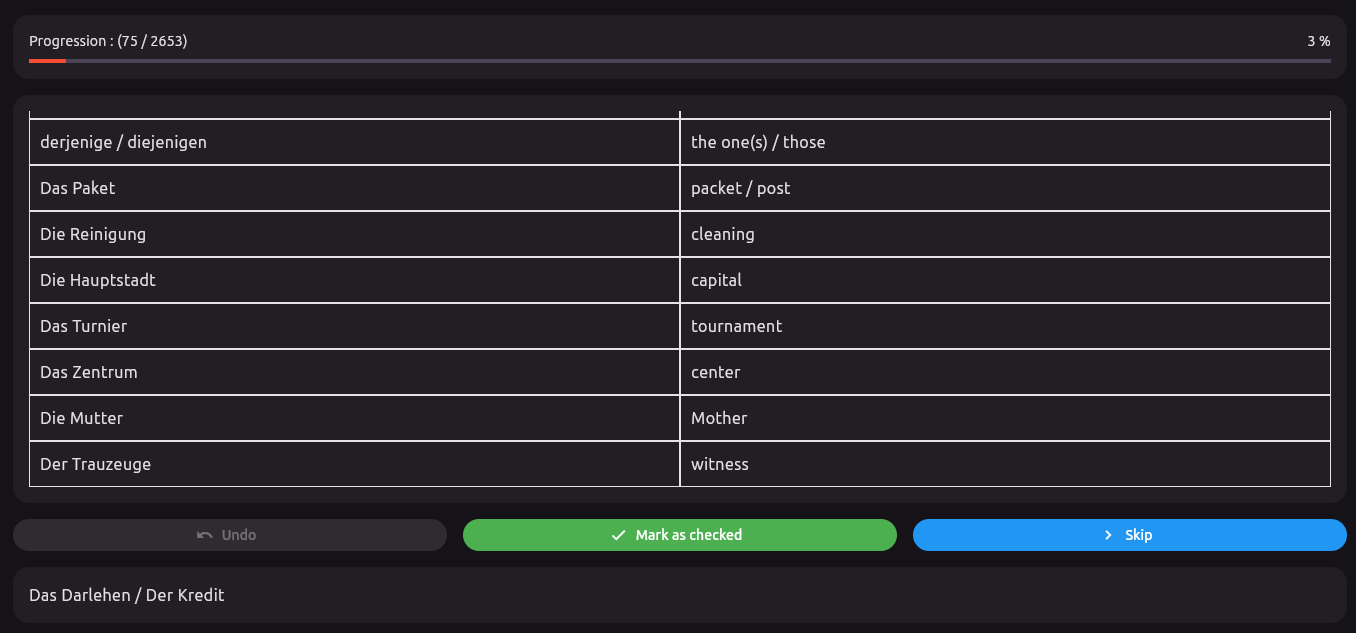
The page consists of the following sections:
| Section | Description |
|---|---|
| Progression | Shows the user's current progress in a given mode, displayed as: checked questions / total questions. |
| History | Displays all previous questions and their correct answers. |
| Undo Button | This button is only active if the user has checked the previous question. Clicking it will uncheck the previous question, making it available for review again. This is useful if the user realizes their answer was incorrect. |
| Mark as Checked Button | Marks the current question as completed and proceeds to the next question. The question and its answer are added to the History section. |
| Skip Button | Skips the current question without marking it as completed. The question and its answer are still added to the History section. |
| Question Section | Displays the current question. The user should guess the answer and then self-evaluate by comparing their guess with the revealed answer in the History section. |
How the Exam Works
The page is designed to work as follows:
- First, a question is displayed.
- The user tries to guess the answer mentally.
-
After guessing, the user has two options:
- If the user believes their answer is correct, they can click the Mark as checked button. This marks the question as completed and reveals the correct answer.
- If the user couldn't find an answer or believes their answer is wrong, they can click the Skip button. This skips the current question and reveals the correct answer.
- If the user later realizes their answer was wrong, they can click the Undo button. This will uncheck the previous question, making it appear again in future selections.
The goal of this design is to give users the flexibility to evaluate their own performance, as there is no single perfect way to express an answer, and users might phrase answers differently.